

From script to shot list
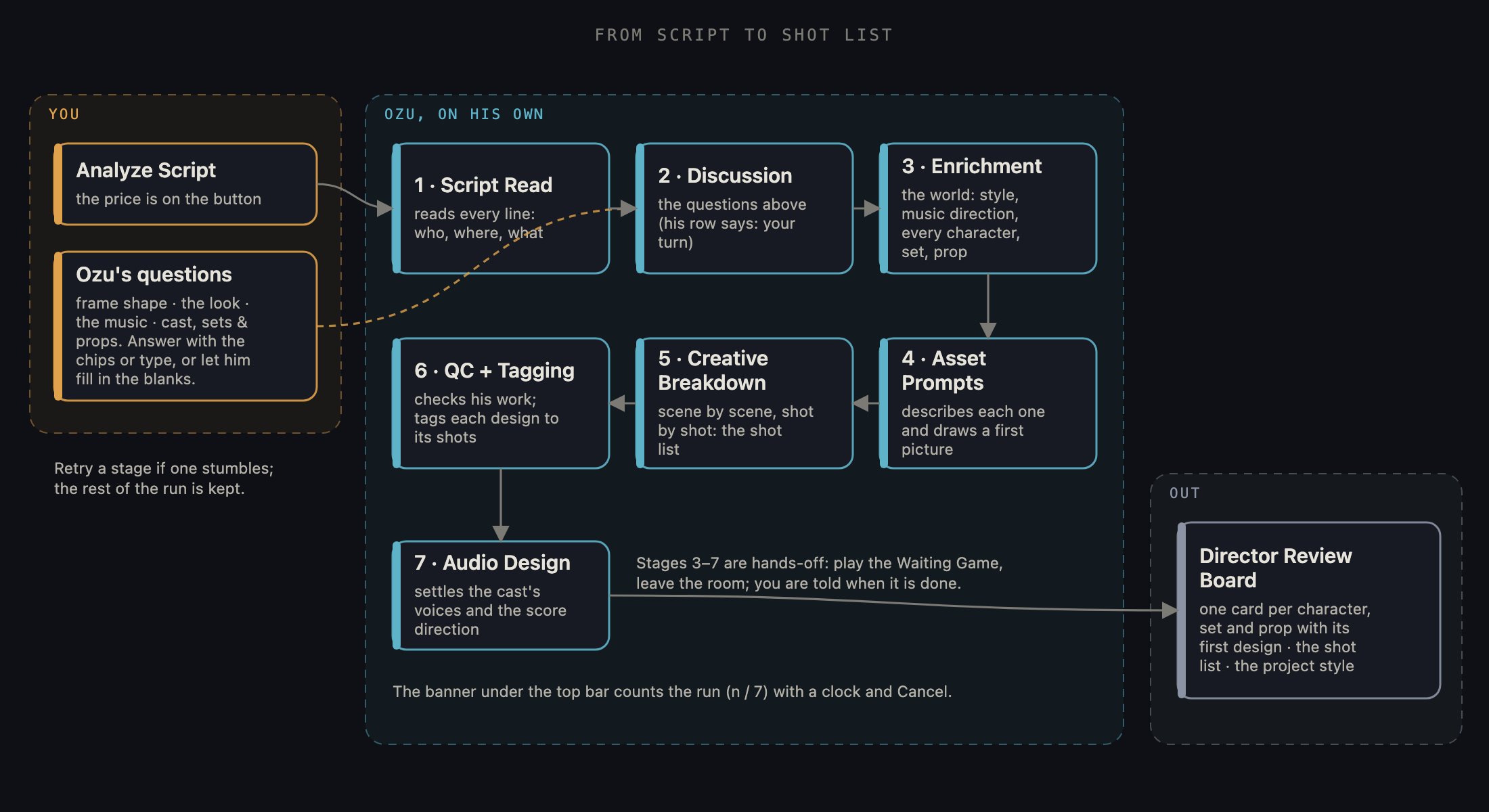
Follow the run left to right: what you do at the start, the stages Ozu works through on his own, and what leaves for the Director Review Board.
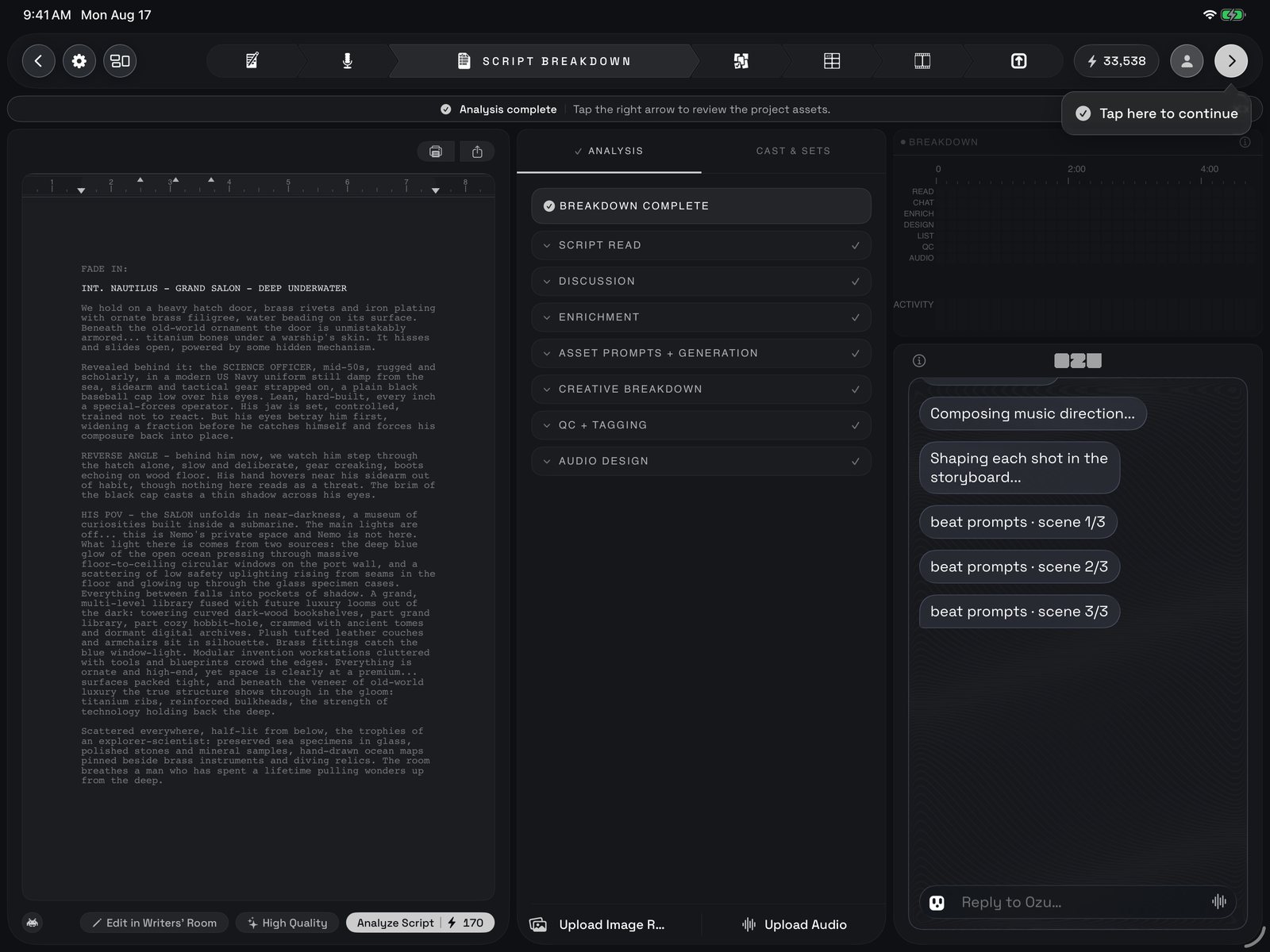
The whole room after a run: the locked script on the left, the Analysis tab with every stage ticked in the middle, and the progress chart over Ozu's chat on the right, with the banner across the top pointing at the arrow.
1 · The script column
The page on the left is your script exactly as you locked it in the Writers’ Room, read-only here. Under it sits one row of buttons. Edit in Writers’ Room takes you back if a line needs changing. The tier pill shows whether this project generates in High Quality or Low Cost and lets you switch before you analyze; Low Cost uses cheaper picture and video models for everything made from here on, and the pill locks while a run is going. On the right is Analyze Script, the one tap this room exists for, with its price on the button. On your first visit a welcome card says the same, and its button is Analyze itself.2 · Analyze Script
Tap it and a cost card shows what this run spends; Continue starts it, and you can stop being asked. If your script is long enough to be several films, Ozu first offers to split it into one project per scene; if this project is one scene of a split script and Scene 1 is not approved yet, the room says so and lets you run anyway or wait and inherit Scene 1’s cast. Then the run begins: the page dims and locks under a slow sweep of light, a banner under the top bar names the stage Ozu is on and counts it (1 of 7), keeps a clock, and carries a Cancel button that stops the run at the end of the current stage. Ozu says hello in the chat on the right, and the middle column switches to its Analysis tab.3 · Ozu’s questions
The first minute or two is a conversation, in the chat on the right. If the project has no frame shape yet, Ozu asks whether this is a widescreen thing or something for a phone, and the aspect-ratio chips answer him: ultra-wide, widescreen, square or vertical. After a greeting he asks the big one: what is the overall look? Live action, cinematic, animated, or write your own in the message line. He follows up: which films or directors, which decade. Then the music: a composer, a style, or no score at all (silence is a fair answer; you can add music later in the Booth). Then he counts the questions he still has about the cast, the locations and the key props, and offers a choice: run through them together, or let him fill in the blanks himself. Answer with the chips or in your own words. If something in your script might not pass a stricter picture model, he says so and asks whether to switch (changeable later in project settings). When he has what he needs, the run is his.4 · The Analysis tab
The middle column has two tabs. Analysis is the live one: a card for every stage, opening as Ozu reaches it, with a small square for each task inside, a clock, and a checkmark when the stage is done. Tap a card’s header to fold it; the run does not care. In order:- Script Read: Ozu reads the whole script and pulls out the plain facts: who is in it, where it happens, what matters.
- Discussion: the conversation above; the row says your turn while he waits on you.
- Enrichment: he builds the world: the project’s visual style, the music direction, and each character, set and prop, which appear here as they are found and land in Cast & Sets at the same moment.
- Asset Prompts + Generation: he describes every character, set and prop and draws a first picture of each. One row per picture; ready when it lands.
- Creative Breakdown: scene by scene, shot by shot, he decides what each shot is; Scene 1, Shot 1.1, Shot 1.2 tick past.
- QC + Tagging: he checks his own work and tags every design to the scenes and shots it appears in, so the call sheet is right downstream.
- Audio Design: the cast’s voices are settled (if you recorded dialogue in the Booth, the row simply says your cast) and the score direction is composed alongside, or noted as yours, or as no score if that was your call.
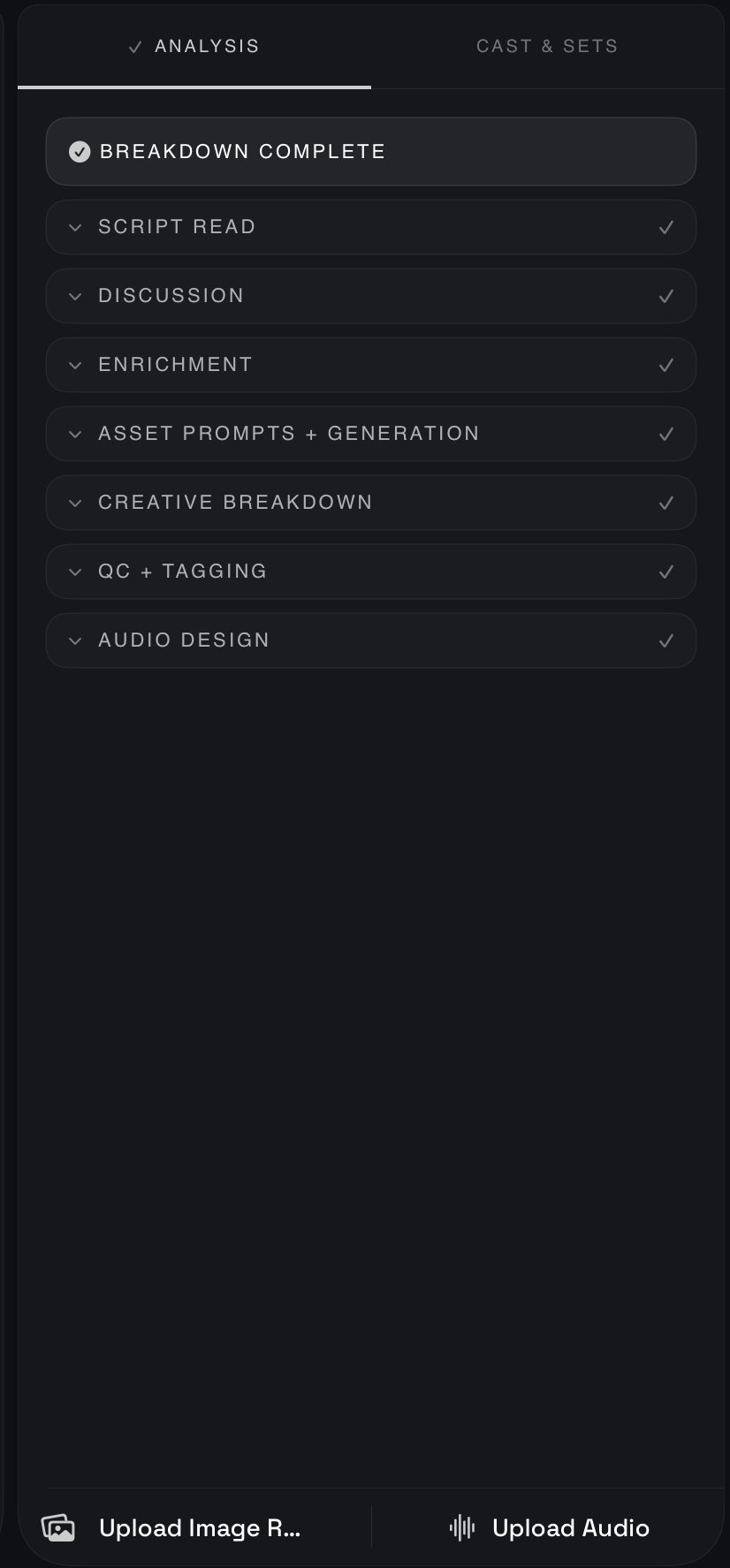
The Analysis tab close up: BREAKDOWN COMPLETE at the top, then the seven stage cards, each folded with its tick; open one to read its task rows.
5 · While Ozu works
Once your questions are done, the run is hands-off. The page says Breaking down script: Ozu is working, this runs on its own, and the Waiting Game opens over the dimmed script to give you something to do; close it and it stays closed for that run, and the small button at the left of the footer brings it back. You do not have to stay. Leave the room or close the app; the breakdown keeps going, and you are told when it is done.6 · Cast & Sets
The other tab, Cast & Sets, is where the results collect. At the top are two rows for the whole film: Project Style, the look Ozu settled on from your answers, and Music Style, the score direction. Under them, one row per character, set and prop, grouped as Actors, Sets and Props. Tap a row to read the description Ozu wrote for it; tap again to close. Once a design is drawn, the row’s icon becomes its picture. Everything here reappears on the Director Review Board as a card you can approve or redo.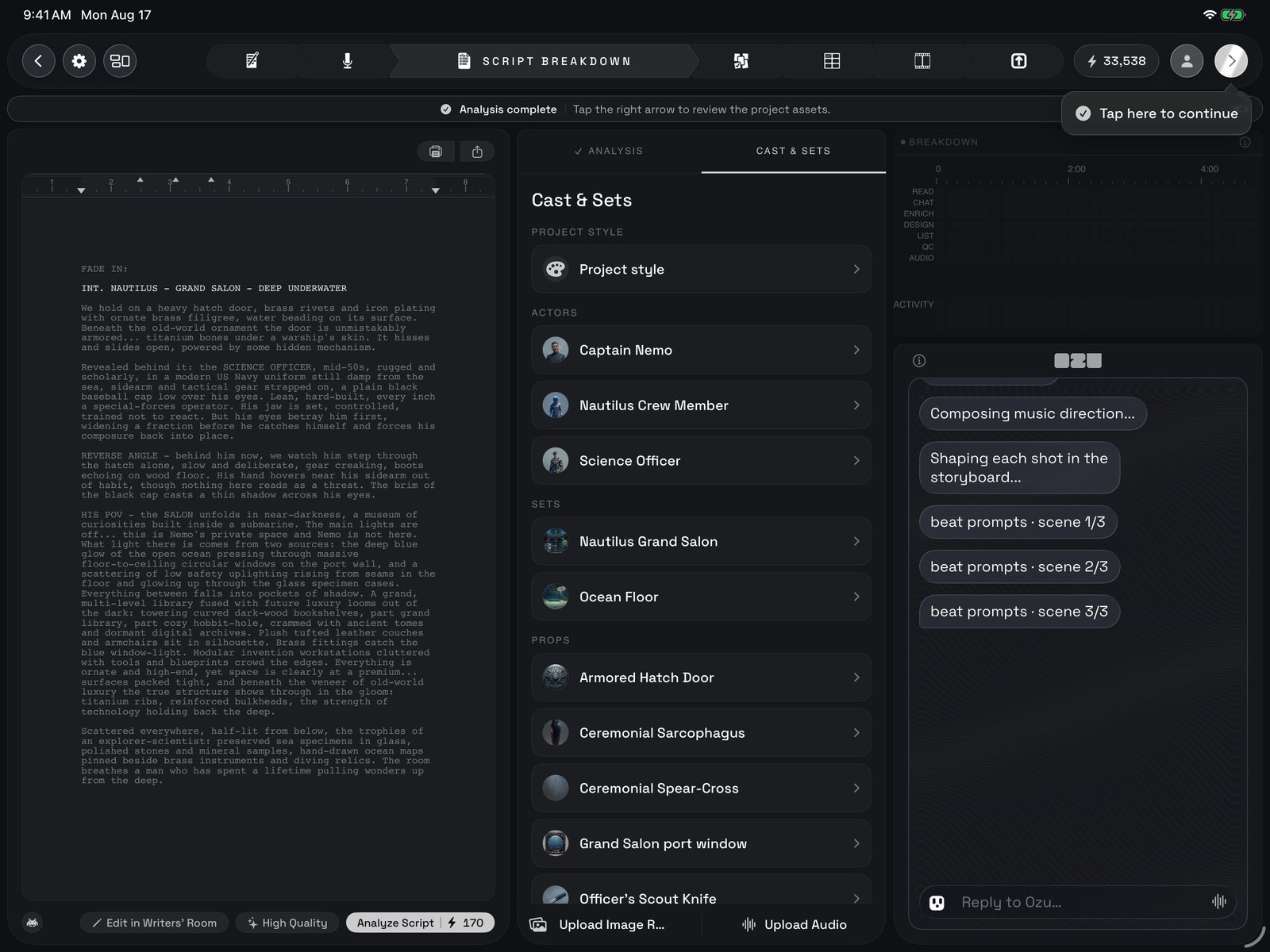
The Cast & Sets tab after a run: Project Style at the top, then Actors, Sets and Props as rows you can open, and the upload buttons along the foot.
7 · References
The bottom row of the middle column is for things you bring in yourself, in either tab. Upload Image Reference opens your photos; pick a picture of a character and name it as the character is named in the script, so it links to the right actor when the designs are drawn. Upload Audio brings in a recorded track and asks whether it is dialogue or score: dialogue is cut to your script’s lines; a score sets the film’s length and its music. What you upload lists in Cast & Sets under References; hold a tile to remove a picture or an audio track. On the Review Board you can see which pictures a design was drawn from.8 · When it is done
The banner turns into Analysis complete, a small pointer bubble appears under the forward arrow, and the Analysis tab wears a checkmark. Take your time: read the descriptions, fold through the receipt. When you are ready, the forward arrow at the top goes to Director Review, and that tap retires the hint (or dismiss it with its ✕). To change the script first, Edit in Writers’ Room is still there.What happens next
Everything Ozu found and drew here goes to the Director Review Board: one card per character, set and prop, with its first design. There you look at each one, ask Ozu for changes or a new take, and approve the look. Those approved designs are what every storyboard frame and video clip is drawn from, and the shot list Ozu wrote here becomes the frames of the Storyboard right after.This page mirrors the front page of the in-app guide. Inside Ozu, tap ? on the Project Shelf for the guide, or the ⓘ beside any control for that control’s own write-up.